What is LangGraph? Why Use It, How It Works, and a Code Example
If you've built a chatbot with an LLM, you've probably hit a wall: simple prompt-in, answer-out works great for demos, but real applications need memory, branching logic, tool use, and the ability to loop until a task is actually done. That gap is exactly what LangGraph fills.
What is LangGraph?
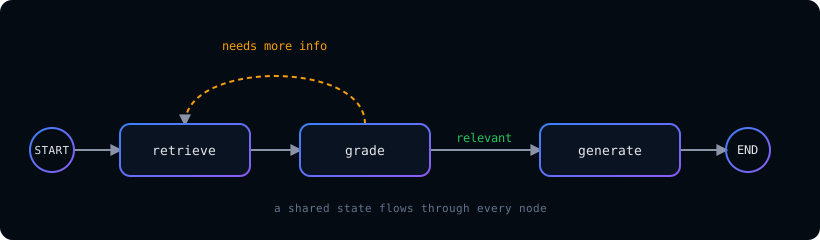
LangGraph is an open-source framework from the LangChain team for building stateful, multi-step AI applications as graphs. Instead of a single linear prompt, you model your application as a set of nodes (steps) connected by edges (transitions), with a shared state that flows between them. Think of it as a flowchart your LLM can actually execute — complete with branches, loops, and decision points.
Why use LangGraph?
Most real-world AI systems aren't one-shot. An agent might need to search the web, read the results, decide whether it has enough information, and loop back if it doesn't. A RAG pipeline might retrieve documents, grade their relevance, and re-query if they're weak. These are control-flow problems, and plain prompt chains handle them poorly. LangGraph is built for exactly this:
- Stateful by design — every step shares and updates a common state, so your app remembers context across the whole workflow.
- Cyclical, not just linear — it supports loops, so an agent can retry, refine, or iterate until a condition is met (something simple chains can't do).
- Controllable — you decide exactly how the flow branches, instead of hoping the LLM behaves.
- Production-ready — built-in persistence, human-in-the-loop checkpoints, and streaming make it suitable for real deployments, not just notebooks.
How to use LangGraph: a minimal example
Here is a minimal but complete LangGraph graph in Python. It defines a shared state, a single node, wires the node between the special START and END markers, compiles the graph, and runs it:
from typing import TypedDict
from langgraph.graph import StateGraph, START, END

# 1. Define the shared state that flows through the graph
class State(TypedDict):
    question: str
    answer: str

# 2. Define a node: a function that reads state and returns an update
def respond(state: State) -> dict:
    # In a real app you'd call an LLM here
    return {"answer": f"You asked: {state['question']}"}

# 3. Build the graph
builder = StateGraph(State)
builder.add_node("respond", respond)
builder.add_edge(START, "respond")
builder.add_edge("respond", END)
graph = builder.compile()

# 4. Run it
result = graph.invoke({"question": "What is LangGraph?"})
print(result["answer"]) # -> You asked: What is LangGraph?Three ideas cover most of what's happening here. The State is a shared object that holds everything the workflow needs (here, a question and an answer). A node is just a function that reads the state and returns the fields it wants to update. Edges connect nodes — START tells the graph where to begin and END tells it where to stop. You compile the graph once, then call invoke() with your initial state.
Adding branches and loops (the real power)
The example above is linear, but LangGraph's superpower is conditional edges — letting the graph decide what runs next based on the current state. That's how you build agents that loop until they're confident, or RAG pipelines that re-retrieve when the context is weak:
# Inside a larger graph with retrieve / grade / generate nodes:
def route(state: State) -> str:
    # Pick the next step based on the current state
    if state["has_enough_context"]:
        return "generate"
    return "retrieve"          # loop back to gather more

builder.add_conditional_edges(
    "grade",                   # after the 'grade' node runs...
    route,                     # ...this function decides where to go next
    {"retrieve": "retrieve", "generate": "generate"},
)With that one pattern, your application can cycle — retrieve, grade, and loop back for more context until it's ready to generate an answer. That cyclical control flow is what separates LangGraph from a plain prompt chain, and it's the foundation of most agentic and agentic-RAG systems.
When should you use LangGraph?
Reach for LangGraph when your application needs more than a single prompt: multi-agent systems, agentic RAG, workflows with tool calls and retries, or anything with branching logic and human-approval steps. For a one-shot summarizer or a simple Q&A bot, a plain LangChain chain is often enough — LangGraph shines when control flow and state get complex.
Want to actually build agentic systems with LangGraph — multi-agent workflows, agentic RAG, and production deployment — hands-on? That's exactly what I teach in my AI/ML bootcamps and corporate workshops.
Get in touchApa itu LangGraph? (Ringkasan Bahasa Indonesia)
LangGraph adalah framework open-source dari tim LangChain untuk membangun aplikasi AI yang stateful dan multi-langkah dalam bentuk graph. Alih-alih satu prompt linear, Anda memodelkan aplikasi sebagai kumpulan node (langkah) yang terhubung oleh edge (transisi), dengan state bersama yang mengalir di antaranya — seperti flowchart yang bisa dieksekusi oleh LLM Anda.
Mengapa pakai LangGraph?
- Stateful — setiap langkah berbagi dan memperbarui state bersama, sehingga aplikasi mengingat konteks sepanjang alur.
- Mendukung loop — agent bisa mencoba ulang, menyempurnakan, atau beriterasi sampai suatu kondisi terpenuhi.
- Terkendali — Anda menentukan persis bagaimana alur bercabang, bukan sekadar berharap LLM berperilaku benar.
- Siap produksi — tersedia persistence, human-in-the-loop, dan streaming bawaan.
Gunakan LangGraph ketika aplikasi Anda butuh lebih dari satu prompt: sistem multi-agent, agentic RAG, atau workflow dengan tool dan retry. Untuk Q&A sederhana, chain biasa sudah cukup. Kemampuan loop dan percabangan inilah yang membedakan LangGraph dari prompt chain biasa.
Ingin belajar membangun sistem agentic dengan LangGraph secara hands-on? Itulah yang saya ajarkan di bootcamp dan corporate workshop AI/ML saya.
Get in touch